Purpose: REPLEI is a generative AI tool for evaluating scientific research plans, identifying shortcomings and presenting suggestions for improvements. REPLEI provides instant feedback on clarity, structure, and coherence, ensuring that research aims, questions, and methods are well-defined and aligned with each other.
Table 1. REPLEI overview
| Keywords | virtual assistant, research assistant, LLM |
| Platforms | Python, OpenAI API, local machine |
| Models | OpenAI GPT-4o |
| Use case or business process | research planning |
| Automated task | reviewing and improving scientific research plans |
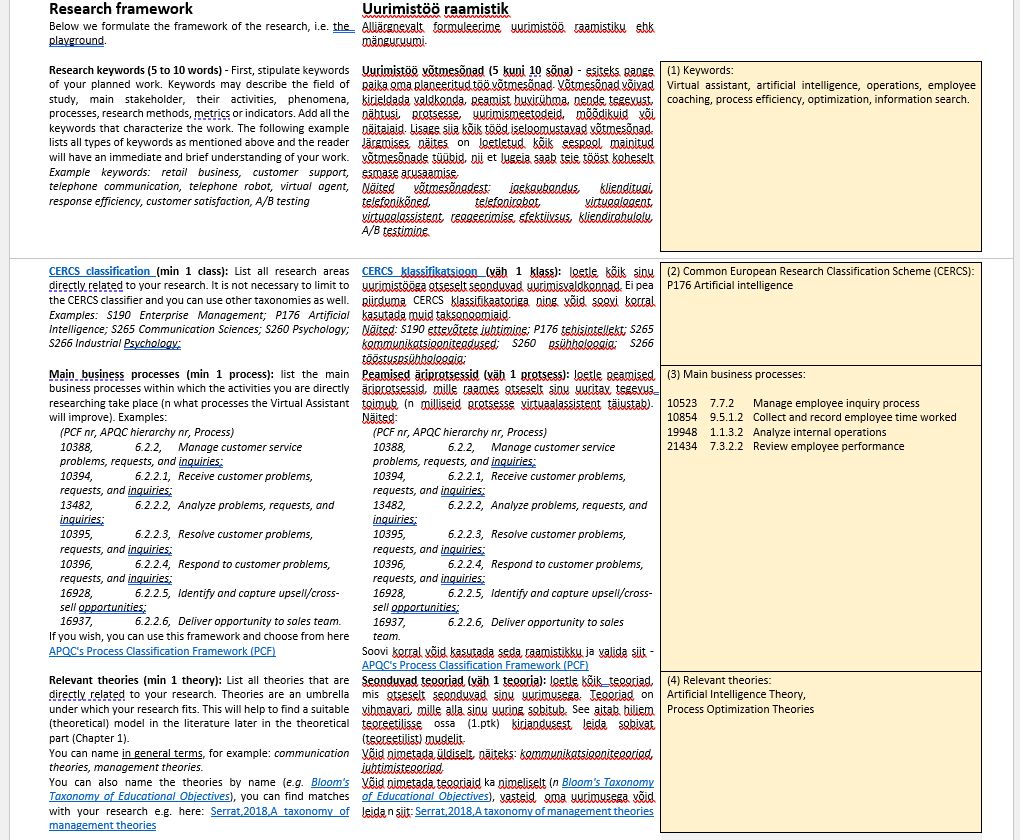
| Input | research plan (DOCX) including descriptions for 64 individual research components, e.g. aim, research questions, sample etc. |
| Transformation | evaluation of research plan component completeness, relevance, writing quality, and alignment with other components |
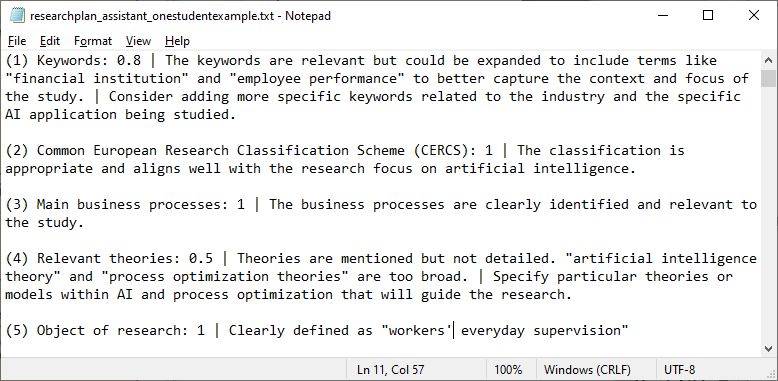
| Output | report (TXT) describing scores for 1) individual research plan components, 2) pairwise alignments and comments for improvements |
Target users
- University lecturers – for reviewing student’s course work research plans. As a teacher, you still play a key role in evaluating critical thinking, originality, and the feasibility of the research. The AI acts as an assistant, but human expertise ensures academic rigor.
- Supervisors, advisors – for reviewing student thesis research plans.
- Researchers – for critically analyzing their own research plans.
System architecture
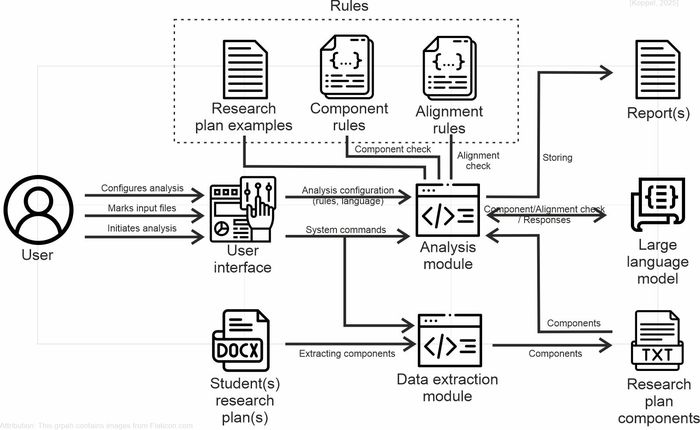
The system architecture consists of the following main parts:
- User Interface – Allows users to configure the analysis, select input files, and initiate the research plan evaluation.
- Student(s) Research Plan(s) – The research documents (in DOCX format) submitted previously by students for analysis.
- Data Extraction Module – Extracts each component from the research plan for further analysis.
- Research Plan Components – A repository of extracted components used for comparison and evaluation.
- Rules (Research Plan Examples, Component Rules, Alignment Rules) – Defines expected research plan structures, necessary components, and alignment criteria.
- Analysis Module – Performs component and alignment checks based on predefined rules.
- Large Language Model (LLM) – Assists in evaluating the extracted components and their alignment, providing feedback.
- Reports – Stores and presents the analysis results, including feedback and necessary improvements.
Configuration options
The system can be configured by modifying rules. Setting rules improves the performance of the system and will ensure that the feedback is domain-specific and based on the examples provided by the user. This helos students to understand the expected standards for their specific research focus.
- User configures the research domain (e.g., business intelligence, business AI etc).
- User sets up configuration rules based on the chosen research domain. This includes defining the required components for the research plan. For each domain, there are different components that are typically expected in a research plan (such as research aims, objectives, data analysis methods, hypothesis, etc.). The user can customize these components to reflect the specific needs of their research plan or class. This could include adding or removing components based on the focus of the research.
- The user can provide examples of well-constructed research plans for that domain, serving as a baseline for evaluation. For example, in business research, an example could show a clearly defined research aim followed by clear methods and objectives. Another example: in AI in business, the plan could include specific sections about data collection methods and AI model design, tailored to the research focus.
System operation
(Optional) Step A. Configure the evaluation settings and rules
The user can optionally configure the tool to fit specific domain and research methods. CONFIGURATION 1 – research domain and methods; CONFIGURATION 2 – research plan structure and required components; CONFIGURATION 3- required alignment between said components.
Step 1. Locating Research plan file(s)
The user selects the research plan document (DOCX format) stored on their computer. The tool allows selecting one or multiple research plans. The latter is useful when evaluating many students’ research plans in one go. The tool provides a folder marking button for easy selection.
Step 2. Research components extraction
The system extracts necessary components (as set by configuration) from the research plan document (DOCX-file) and stores these in TXT-format for later analysis.
Step 3. Initiate the check
3a. Component check. The tool scans the document for required components (about 60 elements). It identifies missing or incomplete sections and generates initial feedback. In this phase, the AI examines whether all required components of the research plan are present and sufficiently described. The AI assesses whether each component is present and whether the descriptions are complete enough for a well-structured research plan. If any section is missing or insufficiently detailed, the tool highlights it for revision.
3b. Alignment check. Once all components are present and adequately described, the AI moves to the second phase: checking alignment between the components. This ensures that the research plan is logically consistent and that each section supports the others. For example, the research questions must directly address the aim. Also, the chosen methods must be appropriate for answering the questions. Next, theories should support the chosen research methods. The tool analyzes whether research components (aim, questions, methodology) are logically aligned. It detects inconsistencies and provides recommendations for better coherence. For example, if a business intelligence project is expected to have a clear methodology aligned with business goals, the tool will check whether the research aim and methods are appropriately aligned with these goals.
By running these two levels of checks, the AI tool ensures that the research plan is both complete and coherent, helping students refine their work systematically.
Step 4. Review evaluation report(s)
The user receives a structured report highlighting missing or insufficient components. The second part of the report provides feedback on logical consistency between research plan sections. Suggestions for improvement are presented.
System output
The system output is an evaluation report. The report will include detailed comments explaining the evaluation, pointing out which parts of the research plan need improvement and why.
The report gives scores for both 1) component check and 2) alignment check elements. That scoring system makes the evaluation more precise and allows for a clear assessment of the research plan’s completeness. Each component (e.g., research aim, methods, questions) is scored from 0 to 1, based on how well it’s described.A score closer to 1 indicates that the component is well-defined, while a score closer to 0 means it’s missing or poorly described.
After the initial check, the second check looks at the alignment between components—whether the research aims, methods, and questions fit logically together.Each alignment aspect is also scored from 0 to 1, with a score of 1 meaning perfect alignment and 0 indicating a complete misalignment or contradiction.
- Score = 0.0 → The component is completely missing.
- Score = 1.0 → The component is fully present, well-described, and meets all requirements.
- Score = 0.5 – 0.9 → The component is present but lacks detail, clarity, or depth.
- Score = 0.1 – 0.4 → The component is mentioned but is vague, incomplete, or poorly developed.
In part one a comment is generated explaining why the component received a certain score, pointing out any gaps or areas lacking sufficient detail. In part two, a comment for each component alignment explains why the alignment is weak or strong, and why certain components may not align appropriately.
Developed by Tarmo Koppel, 2024