Video 1. LENA overview
Video 2. LENA demo
Purpose: LENA is a generative AI tool for transcribing audio recordings and text processing. It is configured to produce lecture notes, identifying the important parts of the lecture and compiling these into a logical structure.
Table 1. LENA overview
| Keywords | virtual assistant, teaching assistant, semantic analysis, concept mining, text summarization, topic modelling, knowledge extraction |
| Technologies | automated speech recognition (ASR), natural language processing (NLP), large language model (LLM) |
| Platforms | Python; OpenAI API; local machine |
| Models | speech to text model OpenAI Whisper large-v2, large language model GPT-4o |
| Supported input languages (audio recordings) | Afrikaans, Arabic, Armenian, Azerbaijani, Belarusian, Bosnian, Bulgarian, Catalan, Chinese, Croatian, Czech, Danish, Dutch, English, Estonian, Finnish, French, Galician, German, Greek, Hebrew, Hindi, Hungarian, Icelandic, Indonesian, Italian, Japanese, Kannada, Kazakh, Korean, Latvian, Lithuanian, Macedonian, Malay, Marathi, Maori, Nepali, Norwegian, Persian, Polish, Portuguese, Romanian, Russian, Serbian, Slovak, Slovenian, Spanish, Swahili, Swedish, Tagalog, Tamil, Thai, Turkish, Ukrainian, Urdu, Vietnamese, and Welsh. |
| Use case or business process | Lecturing |
| Automated task | Lecture notes taking and post-processing |
| Input | Audio recording (mp3, mp4, mpeg, mpga, m4a, wav, and webm) |
| Transformation | Transcription, knowledge retrieval, structuring, text summarization |
| Output | Lecture notes (txt-file) |
| System operators/ application users | Lecturers, teaching assistants |
| Output users | Students |
Context
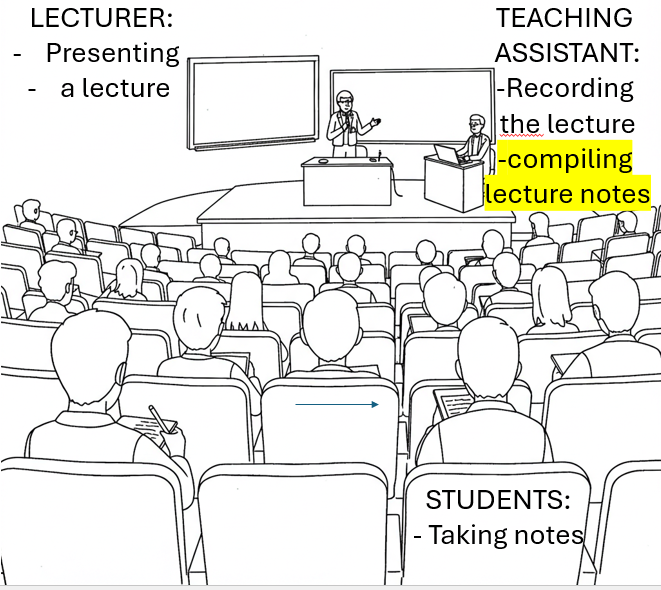
Target users
•Lecturer: Professor delivers the lecture, providing knowledge through speech and visual aids.
•Teaching Assistant (TA): TA records the lecture and later compiles lecture notes based on the recording.
•Students: Students take notes in real-time while listening to the lecture – these are almost always post-processed, summarized lecture notes and presente in a structured order; these are not notes taken on site during the lecture.
Traditional process
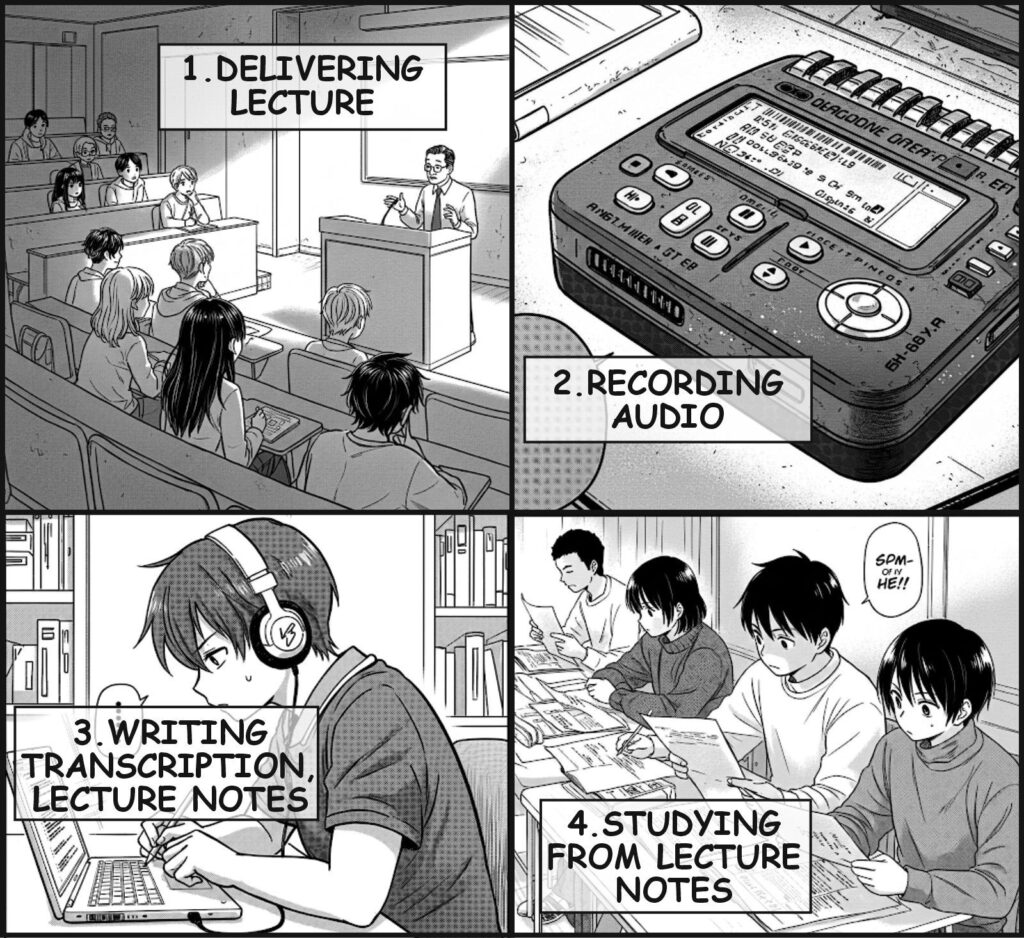
Automated process
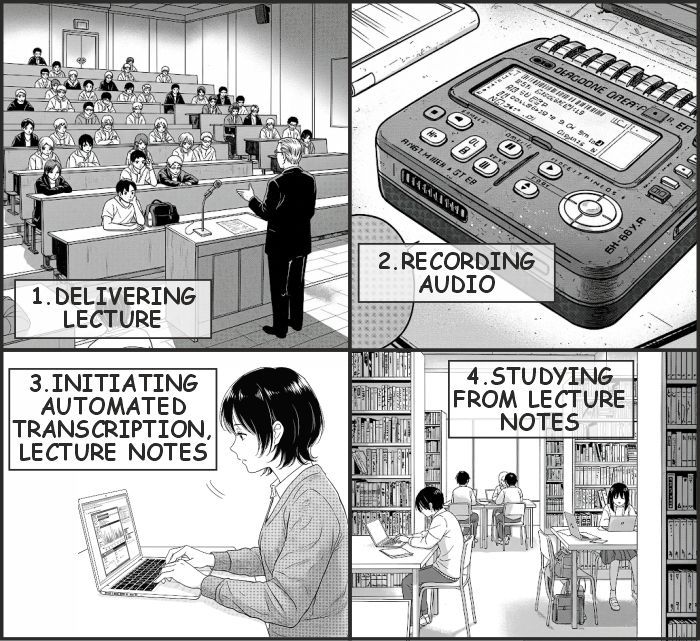
Automation
An automated tool for lecture note compilation and summarization would replace or enhance the role of the teaching assistant by:
- 1.Processing the lecture audio and transcribing it into text.
- 2.Summarizing key points using generative AI to compile concise and structured notes; structure is given by how LENA is configured.
- 3.(the above said includes) Extracting important topics and key concepts, making it easier for students to review the material.
- 4.Generating well-organized lecture notes instantly, reducing the time and effort required for manual note-taking by the TA or students.
With this tool, students can focus on reading the post prepared notes, rather than hurriedly taking notes,
Also, lecturers and institutions can provide high-quality lecture summaries without additional effort. These notes are almost never done by lecturers. I know none such lecturer.
System architecture
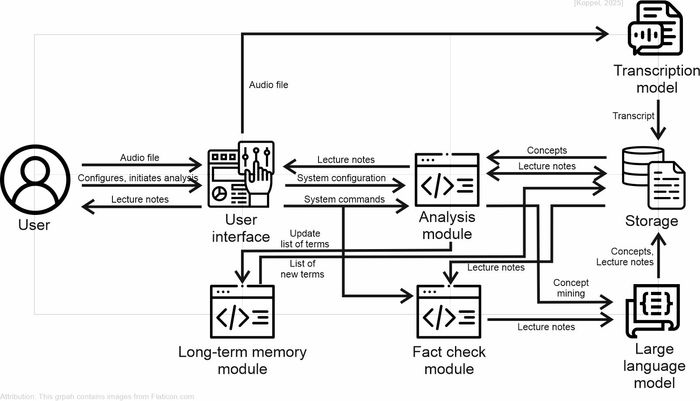
1. User Interaction
- The User initiates the process by uploading an audio file containing a lecture.
- Through the User Interface, the user can configure settings and initiate the transcription and analysis processes.
- The processed lecture notes are eventually returned to the user.
2. Transcription Process
- The audio file is sent to the Transcription Model, which converts the spoken lecture into a text transcript.
- This transcript is stored in the Storage Module for further processing.
3. Analysis Module
- The transcript and lecture notes flow into the Analysis Module, which processes the text to extract key concepts.
- This module also facilitates system configuration and sends system commands for managing the workflow.
4. Fact-Checking Module
- The Fact Check Module ensures the accuracy of the lecture notes by verifying them against reliable sources.
- This module processes the lecture notes and refines them for accuracy and coherence.
5. Large Language Model (LLM)
- The Large Language Model (LLM) assists in concept mining, helping to extract relevant terms and insights from the lecture transcript.
- It sends processed concepts and refined lecture notes back to the Storage Module and the Analysis Module for further refinement.
6. Storage Module
- Acts as a central repository where transcripts, concepts, and lecture notes are stored.
- The stored information is utilized by the Analysis Module and Fact Check Module to enhance lecture notes’ accuracy and relevance.
7. Long-term memory module
- Helps to maintain continuity by preserving essential terms for future reference.
- It interacts with the Analysis module, representing an exclusion list when generating new terms.
- Stores an updated list of new terms extracted from lecture notes.
Final Output The User receives the compiled lecture notes, which have been transcribed, analyzed, fact-checked using AI.
System operation and functionality
Transcription and Translation
The system initiates by converting spoken language into text through an automated transcription process. Two modes of transcription are implemented:
- Transcribe to Original Language: The input audio is processed using an ASR model, preserving the original language.
- Transcribe and Translate to English: The ASR model transcribes the audio, and an additional NLP module translates the output into English.
Users select either mode based on their requirements. The resulting transcripts serve as the foundational dataset for subsequent processing.
Transcript Compilation
Following transcription, the system compiles all transcribed segments into a single document. There might be more than transcription because of the max audio file size (25MB) limit:
- Compiling Transcript: This module integrates segmented transcriptions into a single text document, preserving the original sequence of speech.
Information Extraction and Analysis
To enhance the usability of the lecture notes, the system employs LLM models to extract key informational components. These processes include:
- Term Extraction: Identifies and compiles domain-specific terminology from the transcript, facilitating glossary creation and indexing.
- Concept Extraction: Detects core concepts discussed in the lecture, structuring them for better comprehension.
- Statement Extraction: Identifies key statements and claims, allowing for analytical insights and summarization.
- Example Extraction: Extracts real-world examples that support the identified concepts, aiding contextual understanding.
Memory – The tool remembers terminology from the previous lectures, so when producing list of terms for the current lecture it will exclude those already covered.
Visual Representation
To improve cognitive processing and knowledge retention, the system generates graphical representations of extracted concepts:
- Concept Diagram Generation: An AI-powered diagram generation module visualizes conceptual relationships.
- Concept Integration: Combines textual and visual elements into a cohesive knowledge structure, ensuring a more comprehensive understanding.
Lecture Notes Compilation and Validation
The system consolidates all processed information into a structured document:
- Lecture Notes Compilation: Integrates extracted terms, concepts, statements, examples, and diagrams into a unified document, providing a ready-to-use lecture summary.
- Fact-Checking (Optional): A verification module employs LLM to cross-check extracted information, ensuring accuracy and reliability.
Archiving and Cleanup
The final stage involves organizing output data and optimizing storage. The compiled lecture notes are archived in a dedicated directory. Intermediary information extraction steps outputs (txt-files) are also archived to preserve later possibility for error troubleshooting. Temporary audio files are deleted to manage storage efficiency. The original audio file remains preserved outside the program folder.
System output
Metadata
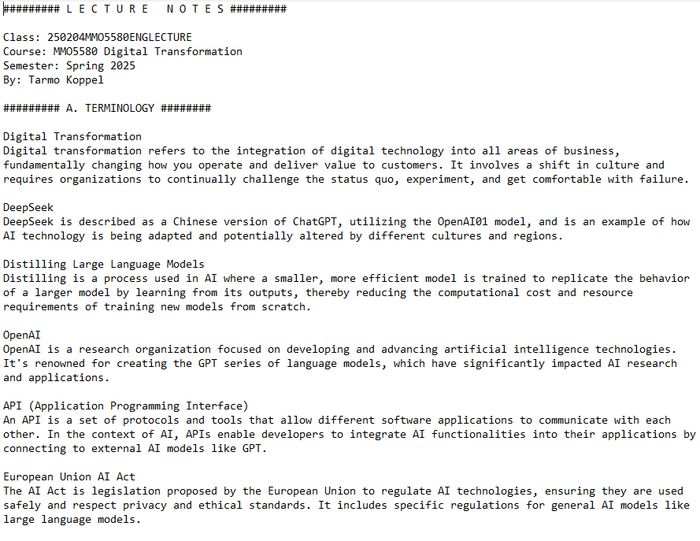
Information about the Class, Course, Semester, Who read the lecture
1. Terminology Extraction and Definition
The tool begins by identifying and defining essential terms from the lecture. This process involves the extraction of technical jargon and key concepts, followed by concise definitions to establish a common understanding. The terminology section forms the foundation of the lecture notes, ensuring that readers are familiar with the terms before delving into more complex discussions. Terms are selected based on their relevance and frequency in the lecture, and they are defined in a manner that aligns with academic and industry standards.
2. Conceptual Framework Construction
Now the tool organizes the core concepts of the lecture into thematic clusters. These clusters represent the main ideas or topics explored during the session. The tool identifies relationships between these concepts and structures them logically to reflect their interconnections. To enhance comprehension, the tool generates diagrams that visually represent key concepts and their relationships. These diagrams are designed to provide visualizations of complex systems. The inclusion of diagrams helps to break down dense textual information and provides a more accessible presentation.
3. Statements and Key Findings
Here, the tool compiles a series of statements that summarize the most important findings and conclusions from the lecture. These statements provide a quick reference to the major takeaways, allowing the reader to quickly grasp the key points of the lecture without wading through the entire document. The tool structures these statements in a list format.
4. Real-Life Applications and Examples
The tool further enriches the lecture notes by including real-life case studies or examples that illustrate how the discussed concepts are applied in practice.
Lecture notes examples
Developed by Tarmo Koppel, 2025